


NOTE: For information about the 3270 keyboard, refer to the 3270/3179G User Manual.
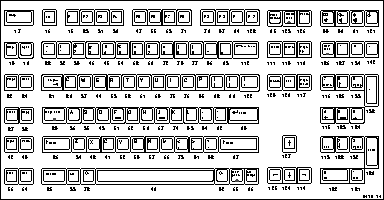
Figure A-8 Sun V Keyboard.
To permit entry of the full North American character set from all keyboards, some international keyboards have one or more keys with dual legends on them. Legends on the left of LK401/VT200 keyboards are typewriter legends and legends on the right are data processing (DP) legends. (Legends on the right of 102-key keyboards are alternate graphic legends.)
You can enable DP legends for the LK401/VT200 keyboards from the Main Menu of Setup. The Main Menu displays a DP Mode item when you set Keyboard Type to VT200 and Language to one of the international languages. When you need these special symbols, enable the DP keys by clicking DP Mode to On. Click this item to Off when you need the usual national characters of the keyboard. If you want to run TekXpress compose, load the compose sequences. For details, refer to the Compose and Diacritical Sequences section later in the manual.
If TekXpress compose is enabled, you can also access DP legends from the keyboard (rather than through Setup) by using Compose sequences. To enter a DP legend, press the Compose key and then the desired key. So that you can enter all ASCII characters, several keyboards have compose sequences for DP keys that do not have DP legends on the keycaps. These compose sequences appear in the tables that follow. For more information about Compose sequences, refer to Compose and Diacritical Sequences later in this appendix.
When DP mode is off, the two-key sequences for accessing DP characters (Tables A-1 - A-9) supercede the three-key compose sequences involving the Compose-DP keys.
Tables A-1 through A-9 summarize the DP characters that are sent for each LK401/VT200-style international keyboard. These tables show both the Typewriter Mode and Data Processing Keys mode. As noted, some compose sequences do not have DP legends. Keyboards not appearing in these tables do not offer DP keys.
|
Mode VT200
|
Key State
|
DP Keys
|
Compose-DP Keys
| ||||||
|---|---|---|---|---|---|---|---|---|---|
|
§ @ 3
|
Å [ ]
|
Ø \ #
|
|
|
* '
|
( 8
|
) 9
| ||
|
Typewriter
|
Normal
|
3
|
å
|
ø
|
|
|
|
|
{
|
}
|
|
Shft
|
§
|
Å
|
Ø
|
|
|
|
|
| |
|
Data Processing Keys
|
Normal
|
3
|
]
|
#
|
|
|
|
|
|
|
Shft
|
@
|
[
|
\
|
|
|
|
|
| |
|
LK401
|
Key State
|
§ @ ~
|
£ # 3
|
Æ [ {
|
Å ] }
|
Ø \ |
|
* '
|
( 8
|
) 9
|
|
Typewriter
|
Normal
|
~
|
3
|
æ
|
å
|
ø
|
|
|
{
|
}
|
|
Shft
|
§
|
£
|
Æ
|
Å
|
Ø
|
|
|
| |
|
Data Processing Keys
|
Normal
|
~
|
3
|
{
|
}
|
|
|
|
|
|
|
Shft
|
@
|
#
|
[
|
]
|
\
|
|
|
| |
|
Mode VT200
|
Key State
|
DP Keys
|
Compose-DP Keys
| |||||||
|---|---|---|---|---|---|---|---|---|---|---|
|
6 § [
|
7 è ]
|
% ù \
|
|
|
|
@ #
|
9 ç
|
0 à
| ||
|
Typewriter
|
Normal
|
§
|
è
|
ù
|
|
|
|
|
|
{
|
}
|
|
Shft
|
6
|
7
|
%
|
|
|
|
|
|
| |
|
Data Processing Keys
|
Normal
|
[
|
]
|
\
|
|
|
|
|
|
|
|
Shft
|
6
|
7
|
%
|
|
|
|
|
|
| |
|
LK401
|
Key State
|
6 § [
|
7 è ]
|
% ù \
|
2 è |
|
9 ç {
|
0 à }
|
@ #
|
9 ç
|
0 à
|
|
Typewriter
|
Normal
|
§
|
è
|
ù
|
2
|
9
|
0
|
|
|
{
|
à
|
|
Shft
|
6
|
7
|
%
|
|
|
|
|
|
| |
|
Data Processing Keys
|
Normal
|
[
|
]
|
\
|
è
|
ç
|
à
|
|
|
|
|
Shft
|
6
|
7
|
%
|
|
|
{
|
}
|
|
|
| |
|
Mode VT200
|
Key State
|
DP Keys
|
Compose-DP Keys
| |||
|---|---|---|---|---|---|---|
|
Ü \ @
|
Ä [ ]
|
' #
|
( 8
|
) 9
| ||
|
Typewriter
|
Normal
|
ü
|
ä
|
|
|
{
|
}
|
|
Shft
|
Ü
|
Ä
|
|
|
| |
|
Data Processing Keys
|
Normal
|
@
|
]
|
|
|
|
|
Shft
|
\
|
[
|
|
|
| |
|
Key Cap
|
Typewriter
|
Data Processing Keys
|
Compose-DP Keys
| ||
|---|---|---|---|---|---|
|
Normal
|
Shft
|
Normal
|
Shft
|
| |
|
, #
|
|
|
|
|
|
|
|
( 8
|
|
|
|
|
{
|
|
) 9
|
|
|
|
|
}
|
º\ 9 9 ^ ¬
|
^
|
º\9
|
¬
|
º\9
|
|
|
! ¡ 1 1
|
1
|
!
|
1
|
¡
|
|
|
" 2 2
|
2
|
"
|
2
|
"
|
|
|
§ £ 3 3
|
3
|
§
|
3
|
£
|
|
|
$ ¤ 4 1/4
|
|
|
1/4
|
¤
|
|
|
% 5 1/2
|
|
%
|
1/2
|
%
|
|
|
& 6 3/4
|
6
|
&
|
3/4
|
&
|
|
|
/ 7 {
|
7
|
/
|
{
|
/
|
|
|
( 8 [
|
8
|
(
|
[
|
(
|
|
)±\91 \91 \91 \91 \91 \91 \91 \91 \91 \91 \91 \91 \91 \91 \91 \9 \91 \91 \91 \91 \91 \91 \91 \91 \91 \91 \91 \91 \91 \91 \91 \91 9 ]
|
9
|
)
|
]
|
±\91 \91 \91 \91 \91 \91 \91 \91 \91 \91 \91 \91 \91 \91 \91 \9 \91 \91 \91 \91 \91 \91
|
|
|
= º\91 \91 \9 \91 \91 \9 \ 91 \91 \91 \9 \91 O }
|
O
|
=
|
}
|
º\9
|
|
? ¿ \ \
|
|
?
|
\
|
¿
|
|
|
\Q ´ ¸
|
´
|
\Q
|
¸
|
\Q
|
|
|
Q @
|
q
|
Q
|
@
|
Q
|
|
|
R\91 \91 \91 ® ¶
|
r
|
\91 \91 \91 R
|
¶
|
®
|
|
|
Z ¥
|
z
|
Z
|
z
|
¦¥
|
|
|
O Ø
|
o
|
O
|
Ø
|
o
|
|
P 
|
p
|
P
|
p
|
|
|
|
Ü º
|
ü
|
Ü
|
¨
|
º
|
|
|
* - +
|
+
|
*
|
~
|
-
|
|
|
A Æ
|
a
|
A
|
æ
|
Æ
|
|
|
S §
|
s
|
S
|
|
§
|
|
D D
|
d
|
D
|
|
D
|
|
|
F ª
|
f
|
F
|
f
|
ª
|
|
|
; X ,
|
,
|
;
|
,
|
X
|
|
|
K &
|
k
|
K
|
k
|
&
|
|
|
Ö ¢
|
ö
|
Ö
|
¢
|
Ö
|
|
|
Ä ^
|
ä
|
Ä
|
^
|
Ä
|
|
|
´¦ # \Q
|
#
|
´
|
\Q
|
´
|
|
|
> < \ 91 \91 \91  \91 \91 \91 \91
|
<
|
>
|
\91 \91
|
|
|
|
Y < y <<
|
y
|
Y
|
<<
|
<
|
|
|
X > x >>
|
x
|
X
|
>>
|
>
|
|
|
C© ¢
|
c
|
C
|
¢
|
©
|
|
|
M º µ
|
m
|
M
|
µ
|
º
|
|
: ÷\91 \9 .·
|
|
:
|
·
|
÷
|
|
|
Mode VT200
|
Key State
|
DP Keys
|
Compose-DP Keys
| |||||||||
|---|---|---|---|---|---|---|---|---|---|---|---|---|
|
1 £ @
|
2 é #
|
9 ç [
|
0 à ]
|
§ \ *
|
|
|
|
% ù
|
= \Q
|
§ $
| ||
|
Typewriter
|
Normal
|
£
|
é
|
ç
|
à
|
*
|
|
|
|
|
|
{
|
}
|
|
Shft
|
1
|
2
|
9
|
0
|
§
|
|
|
|
|
|
| |
|
Data Processing Keys
|
Normal
|
@
|
#
|
[
|
]
|
*
|
|
|
|
|
|
|
|
Shft
|
1
|
2
|
9
|
0
|
\
|
|
|
|
|
|
| |
|
LK401
|
Key State
|
1 £ @
|
2 é #
|
9 ç [
|
0 à ]
|
§ \ *
|
% ù {
|
= ; }
|
! ò |
|
% ù
|
= \Q
|
§ $
|
|
Typewriter
|
Normal
|
£
|
é
|
ç
|
à
|
*
|
ù
|
;
|
ò
|
|
|
{
|
}
|
|
Shft
|
1
|
2
|
9
|
0
|
§
|
%
|
=
|
!
|
|
|
| |
|
Data Processing Keys
|
Normal
|
@
|
#
|
[
|
]
|
*
|
{
|
}
|
|
|
|
|
|
|
Shft
|
1
|
2
|
9
|
0
|
\
|
%
|
=
|
!
|
|
|
| |
|
Mode VT200
|
Key State
|
DP Keys
|
Compose-DP Keys
| |||||||
|---|---|---|---|---|---|---|---|---|---|---|
|
§ @ 3
|
¤ $ 4
|
Å [ ]
|
Ü \ #
|
|
|
Ä
|
( 8
|
) 9
| ||
|
Typewriter
|
Normal
|
3
|
4
|
å
|
ü
|
|
|
|
{
|
}
|
|
Shft
|
§
|
¤
|
Å
|
Ü
|
|
|
|
|
|
| |
|
Data Processing Keys
|
Normal
|
3
|
4
|
]
|
#
|
|
|
|
|
|
|
Shft
|
@
|
$
|
[
|
\
|
|
|
|
|
| |
|
LK401
|
Key State
|
§ @ 3
|
$ 4
|
Å [ ]
|
Ü \ #
|
Ö { }
|
Ä |
|
Ä
|
( 8
|
) 9
|
|
Typewriter
|
Normal
|
3
|
4
|
å
|
ü
|
Ö
|
ä
|
|
{
|
}
|
|
Shft
|
§
|
$
|
Å
|
Ü
|
Ö
|
Ä
|
|
|
|
| |
|
Data Processing Keys
|
Normal
|
3
|
4
|
]
|
#
|
}
|
ä
|
|
|
|
|
Shft
|
@
|
$
|
[
|
\
|
{
|
|
|
|
|
| |
|
Mode VT200
|
Key State
|
DP Keys
|
Compose-DP Keys
| ||||||
|---|---|---|---|---|---|---|---|---|---|
|
ç @ 4
|
è \ ü
|
é [ ö
|
à ] ä
|
£ # $
|
£ # $
|
( 8
|
) 9
| ||
|
Typewriter
|
Normal
|
4
|
ü
|
ö
|
ä
|
$
|
|
|
{
|
}
|
|
Shift
|
ç
|
è
|
é
|
à
|
£
|
|
|
| |
|
Data Processing Keys
|
Normal
|
4
|
ü
|
ö
|
ä
|
$
|
|
|
|
|
Shift
|
@
|
\
|
[
|
]
|
|
|
|
| |
|
LK401
|
Key State
|
ç @ 4
|
è \ ü |
|
é [ ö {
|
à ] ä }
|
£ # $
|
£ # $
|
( 8
|
) 9
|
|
Typewriter
|
Normal
|
4
|
ü
|
ö
|
ä
|
$
|
|
|
{
|
}
|
|
Shift
|
ç
|
è
|
é
|
à
|
£
|
|
|
| |
|
Data Processing Keys
|
Normal
|
4
|
|
|
{
|
}
|
$
|
|
|
|
|
Shift
|
@
|
\
|
[
|
]
|
#
|
|
|
| |
|
Mode
|
Key State
|
DP Key
|
|---|---|---|
|
£ # 3
| ||
|
Typewriter
|
Normal
|
3
|
|
Shft
|
£
| |
|
Data Processing Keys
|
Normal
|
3
|
|
Shft
|
#
|
Network computers directly support compose characters for all X11 clients with LK401/VT200 keyboards, other than North American. DEC VMS and ULTRIX X applications provide their own compose characters. Refer to your DECWindows documentation for information about DEC compose characters.
To use DEC compose characters:
 Select Setup from the Client Launcher. Select either VT200/LK401 ULTRIX (ESC) or VT200/LK401 VMS (F11) as the Keyboard Type.
 Select Setup from the Client Launcher.
For example, on keyboards for which tilde (~) is a diacritical mark, you compose the ñ Spanish character by pressing the "~" key and then pressing the "n" key.
To cancel a diacritical key sequence:
The Compose light turns OFF when you complete the compose sequence.
The acute accent (´) character is a special case: on the keyboard, it shares its visual representation with the apostrophe ('). Depending on the keyboard nationality, the keyboard character on the network computer represents an acute accent (a diacritical mark) or an apostrophe (a character).
Table A-11 shows the diacritical keys available on various keyboards.
a Two single-quote symbols appear on the keyboard. The one on the top row of
keys is a diacritical mark and can be thought of as an acute accent (´). The other
one is not a diacritical mark and can be thought of as an apostrophe ('). Variations from DEC Compose Sequences
The following differences exist between the Tektronix network computer and the DEC VT200 compose sequences:
To cancel a compose sequence:
The Compose light turns OFF when you complete the compose sequence.
a To compose a character with a three-key sequence, press Compose Character followed by the two keys shown in this column.