Introduction to HTC and Condor for (CE) Administrators

INFN online training - March 15th, 2022.
Francesco Prelz, francesco.prelz@mi.infn.it
 ⇔ Program
- High Throughput vs High Performance - why ?
- Role, structure and interplay of the
(HT)Condor
daemons.
Or (1): where are policies configured and enforced?.
Or (2): what are the differences among the three VMs we just set up? - The job life-cycle. "Where" the heck "is" my (or her/his) job ?
- Log files, debug levels and other information sources.
- Brief hands-on session.
⇔ High Performance or High Throughput?
- As usual, the best computing equipment is the one tailored to the application at hand.
- If it weren't for the price tag, anyone would ask for as many execution cores as possible, all available in parallel, now.
- Indeed, institutions that try to elbow their way through the Top 500 list cannot be too concerned about the price tag.
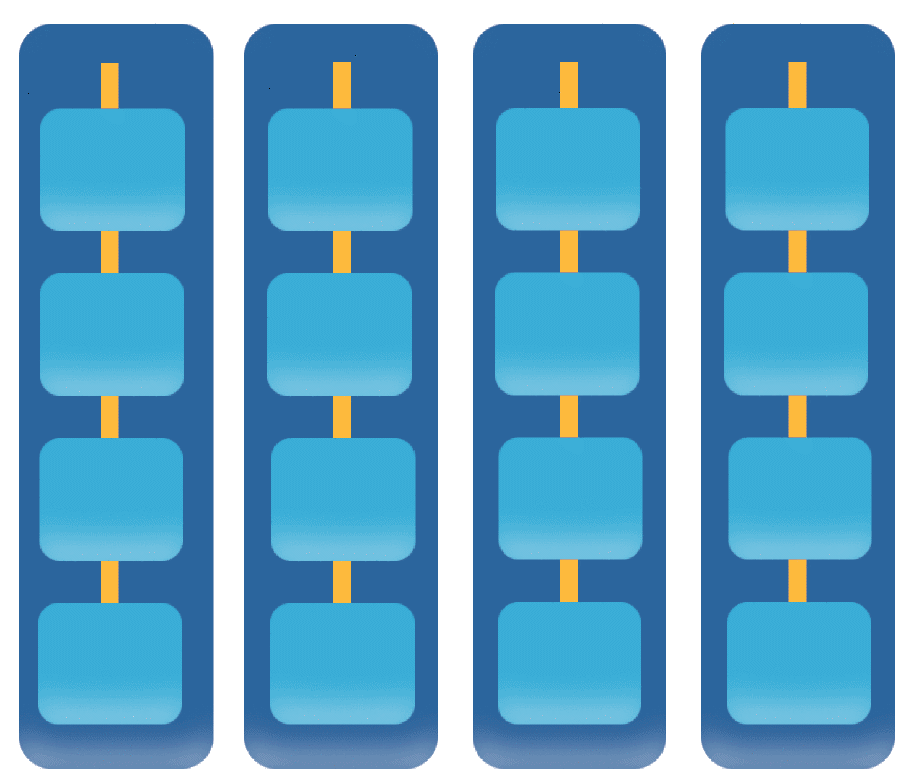
- When "now" and "as many as possible" aren't a real application requirement (as in the many "pleasantly parallel" cases we know well), any available computing equipment, even if slow, heterogeneous and/or poorly connected can contribute some amount of progress to the overall effort. As long as there are tools to harness the workload in that way...
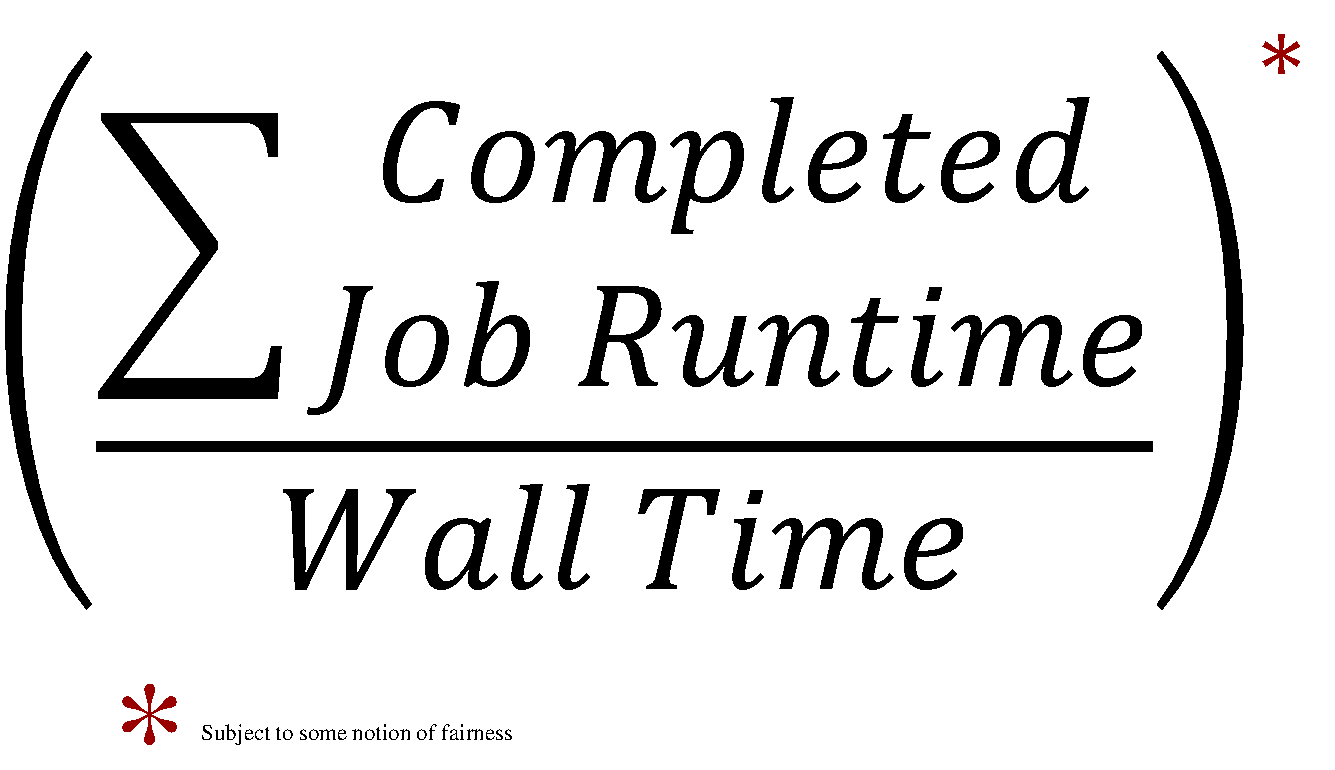
- A few pictures are better than a thousand words!
HTC picture (1/3)
| high-throughput / |
high-performance |
 |
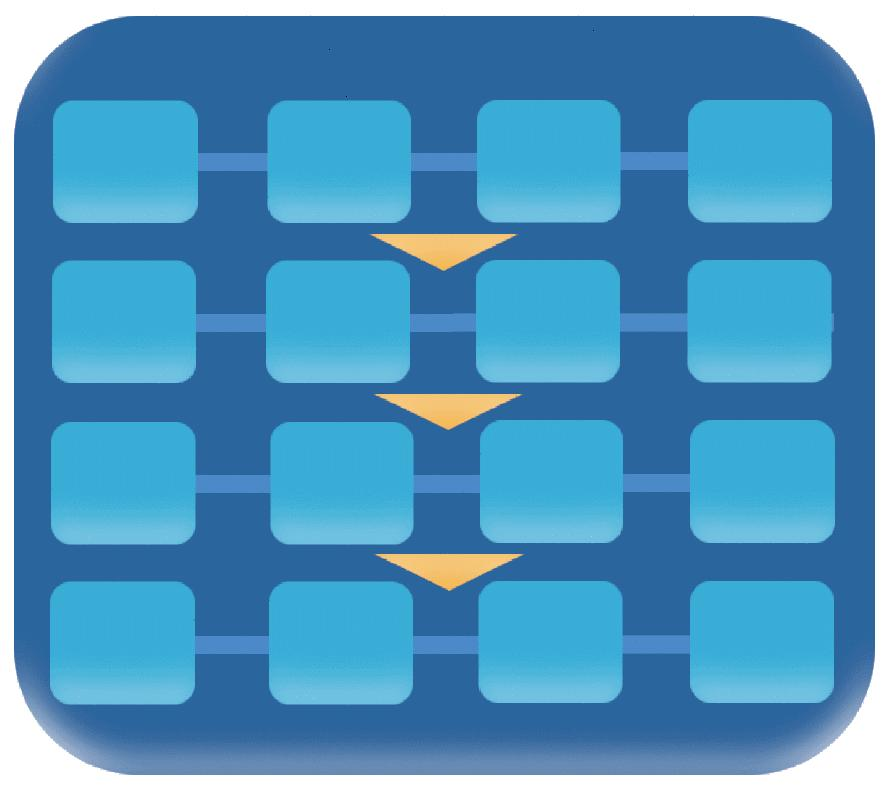 |
HTC picture (2/3)
| high-throughput / |
high-performance |
 |
 |
HTC picture (3/3)
| high-throughput / |
high-performance |
| FLOPY | FLOPS |
 |
 |
⇔ Condor "philosophy"
Condor philosophy in one sentence (Greg Thain's):
To reliably run as many jobs as possible
on as many machines as possible, subject to all constraints.
(in order of precedence - reliability is first! - "Jobs are like money in the bank"®)
- All daemons take a crisply defined responsibility in realising this first principle.
|
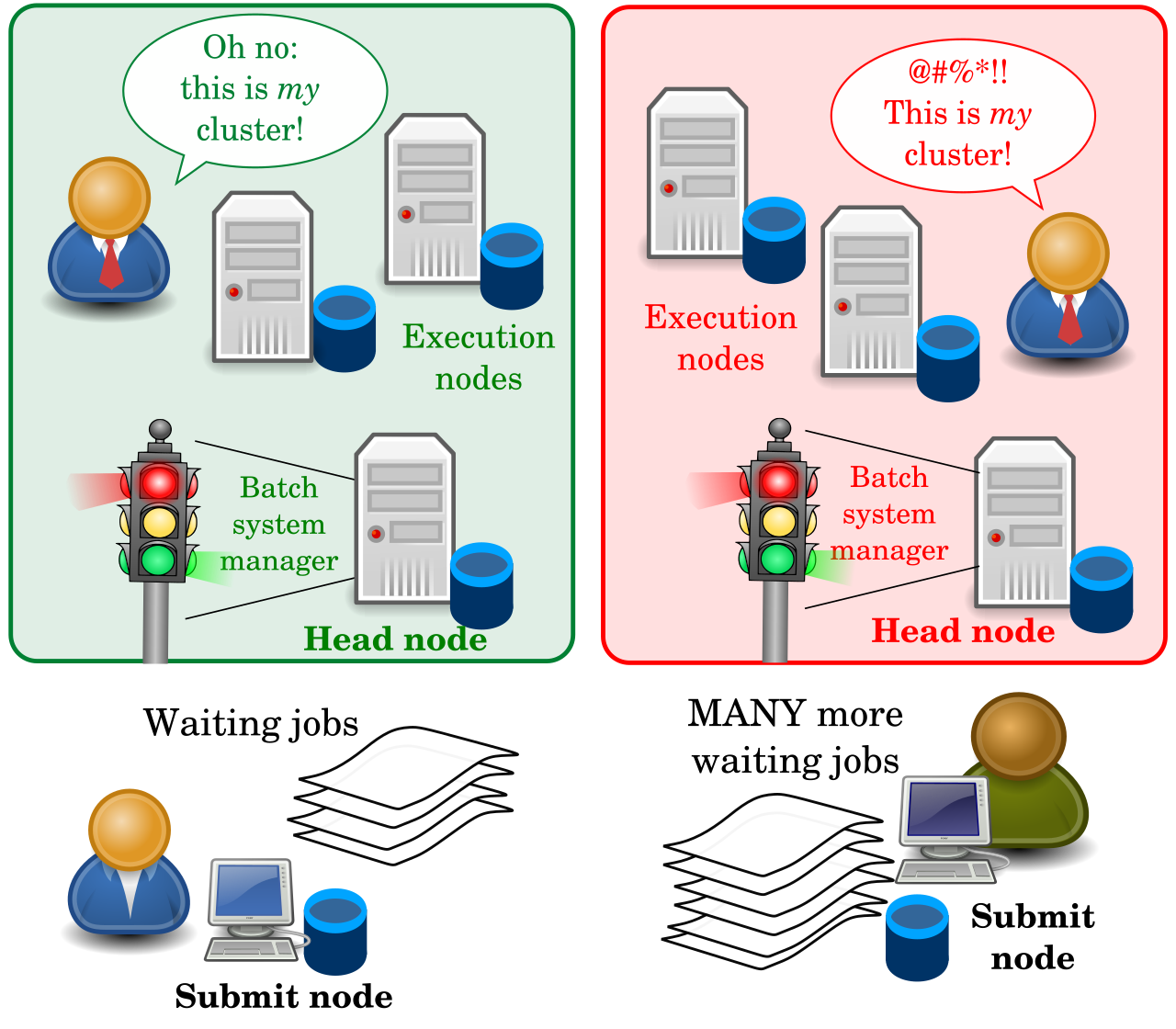
Let's first agree on some generic batch system terminology:
|
⇔ Reliably run...
- Every responsibility in the system is handled by a daemon, typically a UNIX process (unless you are on Windows).
- Each process knows how to exit nicely, handle and report failures.
- No clutter: everything is cleaned up - in case of success or failure.
- Resource usage is measured, reported and limited.
- This requires some management by a parent (or guardian, or
baby-sitter) outside the
process. The
condor_master("systemctl start condor" == runcondor_master):- A small process - runs on every machine where Condor does anything.
- Fork-execs (and restarts, and stops) all needed (configured) processes as children.
- Checks that the kids stay healthy: makes sure they are killed when hung.
- Tunes the Linux kernel if needed.
- Exits when the disk is full.
- Handles admin commands such as
condor_on,condor_off,condor_reconfig. - Distributes
SIGHUP, terminates children when killed.
⇔ ...as many jobs...
- Requires some scheduling (that can occur locally on a submit node).
- Jobs are sent to the
condor_schedd:- A reliable, slow job database.
- Makes sure that jobs are restarted after a crash and no jobs can fall through a bottomless crack.
- The
schedddoesn't really schedule: has jobs, can request machines - but only uses the machines given to it.
- Scalability to handle many jobs is achieved by multiplying
and distributing the
schedds. - The
scheddcan be near the user - can even be disconnected while the jobs keep running - “submit locally, run globally”.
⇔ ...on as many machines as possible.
- Machines will necessarily be heterogeneous.
- Could be on foreign Condor pools.
- Could be on the same pool but with different config.
- Could be in places without shared filesystem or other dependencies or parts of the environment.
- The configuration of the submit side (represented by the
schedd) and of the execution side has to be different, as the responsibilities and the best interest of both sides are different.- All policies are expressed in the same language - Classified ads. We don't have time to enter into too many details here, but ClassAds are fundamentally collections of named expressions, that can reference each other via a small set of 'total' operators and predefined functions. All details are found in the manual here.
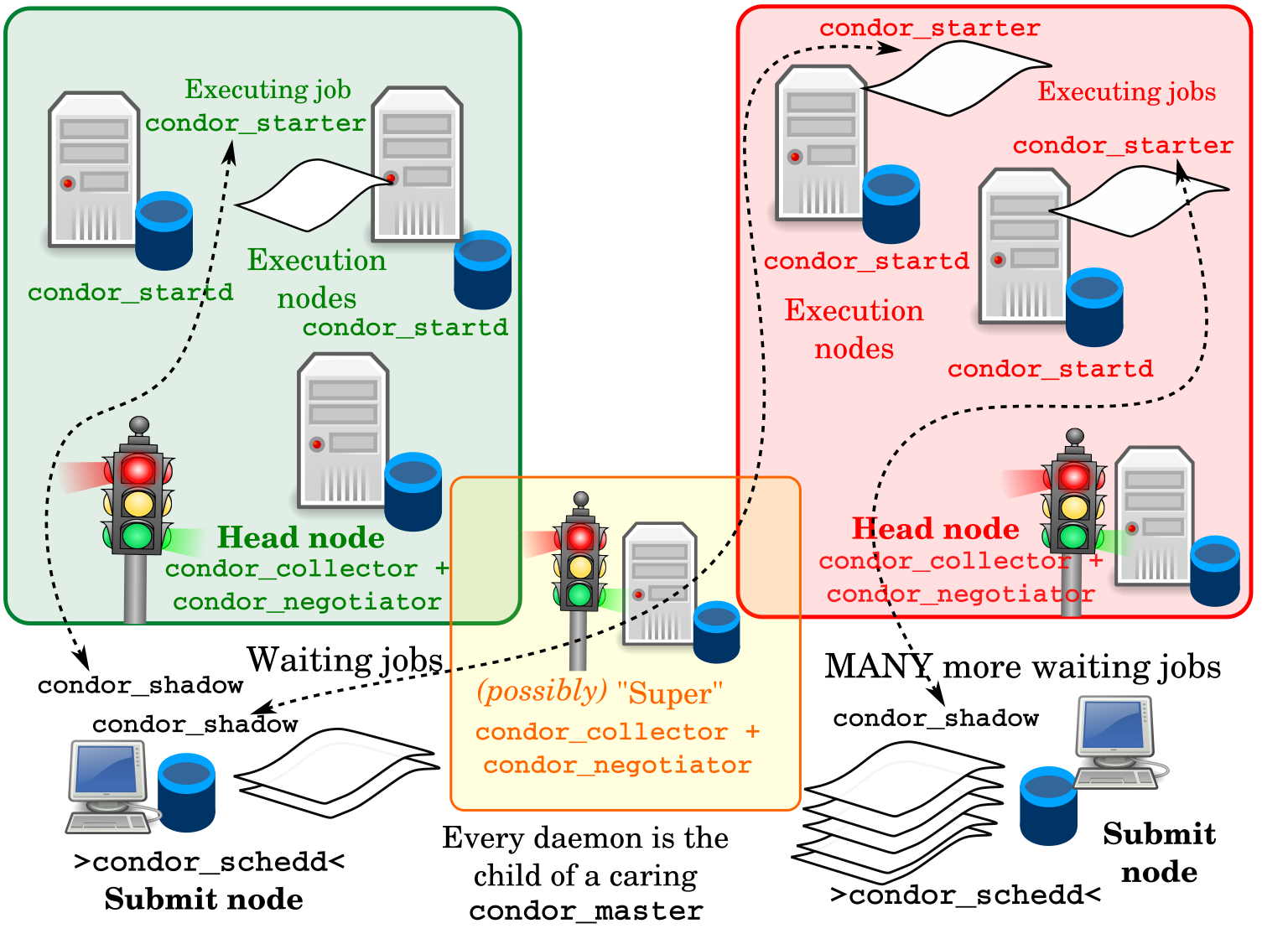
The policy of worker (or execution) nodes is represented by the
condor_startd:
|
|
|
We can now name and locate the various daemons more precisely.
|
⇔ The "Central Manager" (1)
- The
condor_collectoris Condor's central database - normally there's just one - see
condor_config_val COLLECTOR_HOST. - A lightweight service, all in memory, with no permanent storage.
- Every service reports (frequently) to the collector in classad format.
- If the daemon is missing, some activity stops, but jobs don't fail.
- All contents of the
collectorcan be queried with thecondor_statuscommand, just as all contents of thescheddcan be queried withcondor_q.
⇔ The "Central Manager" (2)
- The
condor_negotiatoris where most of the scheduling really happens. - A slow process, constantly cycling through user requests and allocating machines to jobs.
- If the daemon is missing, some activity stops, but jobs don't fail.
- Rich, complex semantics - could talk for hours about it.
- Some relevant policy options are realised here (pre-emption vs. no
pre-emption i.e. fairness vs. throughput, accounting groups and
quotas, concurrency limits):
"very powerful, often ignored". - Enabling debugging output from negotiator gives a cornucopia of information on what's going on.
⇔ The spinning pie
- The matchmaker in the
negotiatortries to achieve long-term fairness in the allocation of resource shares to competing users. - Available compute resources are “The Pie”
- Users, with their relative priorities, are each trying to get their “Pie Slice” (as long as job and machine requirements/"preferences" are satisfied)
- First, the Matchmaker takes some jobs from each user and finds resources for them.
- After all users have got their initial “Pie Slice”, if there are still more jobs and resources, the matchmaker continues “spinning the pie” and handing out resources until everything is matched.
- A user who didn't submit many jobs recently will get larger pie slices for some time.
- HTCondor tracks usage and has a formula for determining priority based on both current demand and prior usage - prior usage exponentially "decays” over time, with configurable decay factors.
- Get all slots in the pool (via
condor_status, possibly selecting them withNEGOTIATOR_SLOT_CONSTRAINT). - Get all submitters with pending requests (
condor_status -submitters). - Compute the number of slots submitters should get
- Based on historical usage (
condor_userprio -all). - With corrections: effective_priority = real_priority * (configurable) priority_factor.
- Priority smoothed by
PRIORITY_HALFLIFE, defaulting to 86400 (seconds - 24 hours).
- Based on historical usage (
- Hand out slots to submitters in ascending effective priority order
(a lower priority value means higher priority in Condor).
- When more matching slots than needed are found,
they are ordered by
RANK.
- When more matching slots than needed are found,
they are ordered by
- As the slot allocation is performed before checking for matches, there will be leftover slots to assign. Repeat as needed.
- The matching ('claimed')
startdandscheddwill begin handling the request - starting thestarterandshadow. Many things can still fail at this level...
⇔ Daemon configuration
- We cannot really substitute the Condor manual when it comes to the details of a 2000+ knob configuration...
- Your best friend is
condor_config_val. It tells you the location of config files:$ condor_config_val -config Configuration source: /etc/condor/condor_config Local configuration source: /etc/condor/condor_config.local (...)It tells you where individual attributes are defined:$ condor_config_val -v CONDOR_HOST CONDOR_HOST = cmcondor.bo.infn.it # at: /etc/condor/condor_config.local, line 4 # raw: CONDOR_HOST = cmcondor.bo.infn.it
-
condor_config_valcan dump the entire config space:$ condor_config_val -dump |head # Configuration from machine: orsone.mi.infn.it ABORT_ON_EXCEPTION = false ACCOUNTANT_HOST = (... etc. etc. etc. ...) - Each individual daemon holds an authoritative copy of the configuration,
(this can be synchronised with
condor_reconfig), butcondor_config_valcan also query each daemon at runtime (and even change the values on the go, if allowed) when one of these switches is used:-master Query the master -schedd Query the schedd -startd Query the startd -collector Query the collector -negotiator Query the negotiator - The current recommendation for local config modifications
is to store them in small snippets in the
/etc/condor/config.ddirectory. Files are read in lexicographical order (the last definition of an attribute takes precedence), and the recommended filename has two leading digits, e.g./etc/condor/config.d/05-some_example.
-
condor_config_valcan also dump the so-called "metaknobs". Logical collections of consistent settings that are used to set up certain host or security profiles (e.g. 'Submit' node, 'Execute' node, 'CentralManager', 'Personal' Condor, Host- vs. User-based security, etc.) as well as other policies and features - see manual here.):$ condor_config_val use ROLE:Submit use ROLE:Submit is DAEMON_LIST=$(DAEMON_LIST) SCHEDD - Caution: there are config overrides via the environment.
Setting env variables named
_condor_ATTRIBUTE_NAME=value(note leading underscore) takes precedence over all other configuration sources. condor_reconfig(or sendingSIGHUPto the master) causes configuration to be re-read and to become effective - with the exception of changes to a few attributes (notablyDAEMON_LIST,NETWORK_INTERFACE, a few security settings, full listing here, that require acondor_restart.
Life cycle of HTCondor job: (again, courtesy Greg Thain)
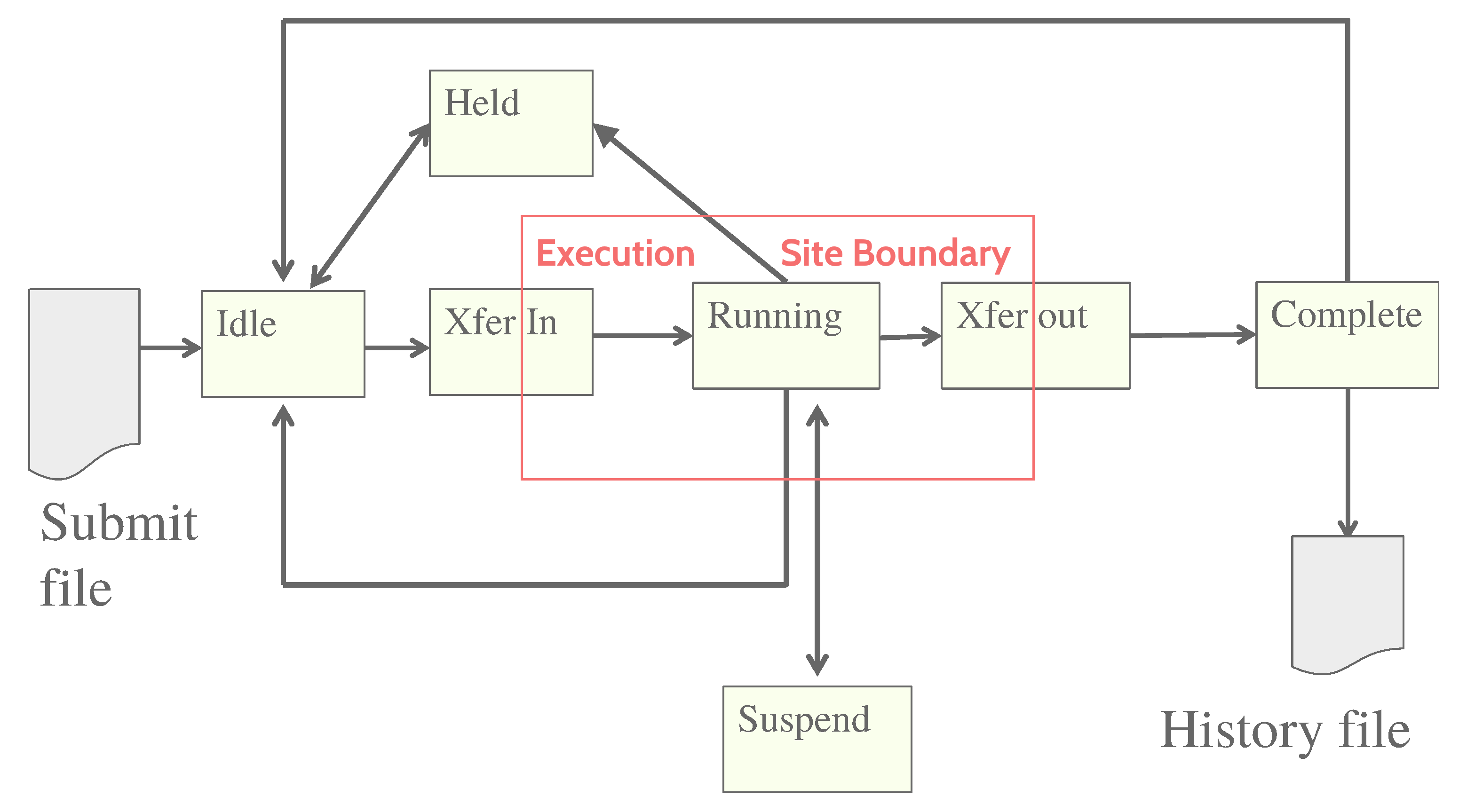
Where it all starts: a submit file. Submit files are not ClassAds.
universe = vanilla
executable = /path/to/my/computation
request_memory = 70M
arguments = $(ProcID)
should_transfer_input = yes
output = out.$(ProcID)
error = error.$(ProcId)
log = /path/to/user.log
+IsVerySpecialJob = true
Queue |
→ | JobUniverse = 5
Cmd = computation
Args = “0”
RequestMemory = 70000000
Requirements = Opsys == “Linux...
DiskUsage = 0
Output = “out.0”
Error = “error.0”
UserLog = “/path/to/user.log”
IsVerySpecialJob = true |
- The file (left) fed into
condor_submitbecomes a ClassAd (right) stored in thecondor_schedd(both in memory and on a backup "bootstrap" file), where it can be accessed via the (expensive!)condor_qcommand. - There's no fixed schema. Attributes prepended with
'+'in the submit files go straight into the ClassAd. - ClassAd can be modified via
SUBMIT_ATTRS,condor_qedit, job transforms.
In both condor_q and condor_status, the
-af ('autoformat') option is very practical to list specific attributes
(-af:l shows the attribute names, -af:th formats a nice table):
But the '-constraint' flag is also interesting, as it can select ClassAds based on their contents:
The same syntax can be used to build a 'Requirements'
expression to select resources to match jobs.
Once again, the full reference for the ClassAd language is found in the HTCondor manual,
here.
"Old" condor_q format (admin-friendly: can be made default by setting
CONDOR_Q_ONLY_MY_JOBS and CONDOR_Q_DASH_BATCH_IS_DEFAULT in the config file):
"New" format:
Why is my (or very-important-user X's) job not starting ?
Let's start with the user-level tools: Check the UserLog. Check the Requirements expressionWhy does a job end up in a 'Held' state ?
Just find the reason in the job ClassAd (-l and -af
work just as for machine ClassAds):
When a user-level approach fails...
- ... superpowers come to the rescue. Check the logs. Usual location:
/var/log/condor/CollectorLog /var/log/condor/SchedLog /var/log/condor/GangliadLog /var/log/condor/ShadowLog /var/log/condor/MasterLog /var/log/condor/SharedPortLog /var/log/condor/MatchLog /var/log/condor/StarterLog /var/log/condor/NegotiatorLog /var/log/condor/StartLog /var/log/condor/ProcLog /var/log/condor/XferStatsLog
- Condor can fetch logs for you with
condor_fetchlog:$ condor_fetchlog `condor_config_val CONDOR_HOST` NEGOTIATOR 11/25/20 02:43:50 Now in new log file /var/log/condor/NegotiatorLog 11/25/20 02:43:50 MaxPrioValue = 46659.054688 11/25/20 02:43:50 NumSubmitterAds = 1 11/25/20 02:43:50 Negotiating with puddu@gaspare.fisica.unimi.it skipped... (... etc. etc. etc. ...) - There are many levels of log verbosity.
How to tweak the log verbosity.
- Relevant config attributes:
ALL_DEBUG(affects all daemons) and<SUBSYS>_DEBUG(with<SUBSYS>==STARTD, SCHEDD, COLLECTOR, NEGOTIATOR, etc...) - Many log 'subsystems' can be enabled. They are detailed in the
manual, here. Most frequently used:
D_FULLDEBUG: This level provides verbose output of a general nature into the log files. Frequent log messages for very specific debugging purposes would be excluded. In those cases, the messages would be viewed by having that another flag andD_FULLDEBUGboth listed in the configuration file.D_ALL: This flag turns on all debugging output by enabling all of the debug levels at once. There is no need to list any other debug levels in addition toD_ALL; doing so would be redundant. Be warned: this will generate about a HUGE amount of output (and cause log files to be rapidly rotated!).D_NETWORK: All daemons (except in part theshadow) log a message on every TCP accept, connect, and close, and on every UDP send and receive.D_SECURITY: Details about the setup of secure network communication, including the negotiation of a socket authentication mechanism, the management of a session key cache and the authentication process itself are logged.
- Logs can be redirected by setting
<SUBSYS>_<LOGLEVEL>_LOG(e.g.COLLECTOR_SECURITY_LOG).
⇔ Reference material
- Videos on Youtube, like pretty much for every other current project.
- HTCondor admin tutorial, given at each and every HTCondor week.
- HTCondor user tutorial, given at each and every HTCondor week (at least the ones held in presence) or at other events.
- HTCondor manual.
- HTCondor Wiki.
- HTCondor mailing lists, including a specific list for INFN users (htcondor-support@lists.infn.it).
- HTCondor on Github.
⇔ Let's try some of this ourselves (1).
- We already started from the install recipe
available from the Condor Download Page.
curl -fsSL https://get.htcondor.org | sudo /bin/bash -s -- --no-dry-run
- A few words on Condor versions. Note: the schema changed significantly with major version 9:
- There is a stable, "Long Term Support" (LTS) version series, or "channel" (currently v9.0.x, with v10.0.0 due to appear shortly) getting only bugfixes.
- New features get frequently added in the 'feature' channels, labeled as v9.y.x, with y ≥ 1 (the last one is v9.5.0) along with any bug fix that would go into stable.
- Periodically, a new LTS series is started from where the 'feature' series reached in the meanwhile.
- Version with the same 'major' number can be expected to interoperate.
- Older major/minor versions will interoperate with the newer versions "wherever they can" - line protocols have been stable for a long time - but odd side-effects are possible.
⇔ Let's try some of this ourselves (2)...
⇔ Thank you!
htcondor-support@lists.infn.it
 Goto Page:
