This section describes how to configure the condor_startd to implement the policy you choose for when remote jobs should start, be suspended, (possibly) resumed, vacated (with a checkpoint) or killed (no checkpoint). This policy is the heart of Condor's balancing act between the needs and wishes of resource owners (machine owners) and resource users (people submitting their jobs to Condor). Please read this section carefully if you plan to change any of the settings described below, as getting it wrong can have a severe impact on either the owners of machines in your pool (in which case they might ask to be removed from the pool entirely) or the users of your pool (in which case they might stop using Condor).
Before we get into the details, there are a few things to note:
![[*]](cross_ref_motif.gif) which explains the differences
between the version 6.0 policy expressions and the later versions.
which explains the differences
between the version 6.0 policy expressions and the later versions.
To define your policy, you basically set a number of expressions in the config file (see section 3.4 on ``Configuring Condor'' for an introduction to Condor's config files). These expressions are evaluated in the context of the machine's ClassAd and the ClassAd of a potential resource request (a job that has been submitted to Condor). The expressions can therefore reference attributes from either ClassAd. First, we'll list all the attributes that are included in the Machine's ClassAd. Then, we'll list all the attributes that are included in a job ClassAd. Next, we'll explain the the START expression, which describes to Condor what conditions must be met for the machine to start a job. Then, we'll describe the RANK expression, which allows you to specify which kinds of jobs a given machine prefers to run. Then, we'll discuss in some detail how the condor_startd works, in particular, the machine states and activities, to give you an idea of what is possible for your policy decisions. Finally, we offer two example policy settings.
The condor_startd represents the machine on which it is running to the Condor pool. It publishes a number of characteristics about the machine in its ClassAd to help in match-making with resource requests. The values of all these attributes can be found by using condor_status -l hostname. On an SMP machine, the startd will break the machine up and advertise it as separate virtual machines, each with its own name and ClassAd. The attributes themselves and what they represent are described below:

The most important expression in the startd (and possibly in all of Condor) is the START expression. This expression describes what conditions must be met for a given machine to service a resource request (in other words, start someone's job). This expression (like any other expression) can reference attributes in the machine's ClassAd (such as KeyboardIdle, LoadAvg, etc), or attributes in a potential requester's ClassAd (such as Owner, Imagesize, even Cmd, the name of the executable the requester wants to run). What the START expression evaluates to plays a crucial role in determining what state and activity the machine is in.
It is technically the Requirements expression that is used for matching with other jobs. The startd just always defines the Requirements expression as the START expression. However, in situations where the machine wants to make itself unavailable for further matches, it sets its Requirements expression to False, not its START expression. When the START expression locally evaluates to true, the machine advertises the Requirements expression as ``True'' and doesn't even publish the START expression.
Normally, the expressions in the machine ClassAd are evaluated against certain request ClassAds in the condor_negotiator to see if there is a match, or against whatever request ClassAd currently has claimed the machine. However, by locally evaluating an expression, the machine only evaluates the expression against its own ClassAd. If an expression cannot be locally evaluated (because it references other expressions that are only found in a request ad, such as Owner or Imagesize), the expression is (usually) undefined. See the ClassAd appendix, section 4.1, for specifics of how undefined terms are handled in ClassAd expression evaluation.
NOTE: If you have machines with lots of real memory and swap space so the only scarce resource is CPU time, you could use the JOB_RENICE_INCREMENT (see section 3.4.12 on ``condor_starter Config File Entries'' for details) so that Condor starts jobs on your machine with low priority. Then, you could set up your machines with:
        START : True
        SUSPEND : False
        PREEMPT : False
        KILL : False
This way, Condor jobs would always run and would never be kicked
off.
However, because they would run with ``nice priority'', interactive
response on your machines would not suffer.
You probably wouldn't even notice Condor was running the jobs,
assuming you had enough free memory for the Condor jobs so that you
weren't swapping all the time.
A machine can be configured to prefer running certain jobs over other jobs. This is done via the RANK expression. This is an expression, just like any other in the machine's ClassAd. It can reference any attribute found in either the machine ClassAd or a request ad (normally, in fact, it references things in the request ad). Probably the most common use of this expression is to configure a machine to prefer to run jobs from the owner of that machine, or by extension, a group of machines to prefer jobs from the owners of those machines.
For example, imagine you have a small research group with 4 machines: ``tenorsax'', ``piano'', ``bass'' and ``drums''. These machines are owned by 4 users: ``coltrane'', ``tyner'', ``garrison'' and ``jones'', respectively.
Say there's a large Condor pool in your department, but you spent a lot of money on really fast machines for your group. You want to make sure that if anyone in your group has Condor jobs, they have priority on your machines. To achieve this, all you have to do is set the Rank expression on your machines to refer to the Owner attribute and prefer requests where that attribute matches one of the people in your group:
        RANK : Owner == "coltrane" || Owner == "tyner" \
               || Owner == "garrison" || Owner == "jones"
The RANK expression is evaluated as a floating point number. However, just like in C, boolean expressions evaluate to either 1 or 0 depending on if they're true or false. So, if this expression evaluated to 1 (because the remote job was owned by one of the blessed folks), that would be higher than anyone else (for whom the expression would evaluate to 0).
If you wanted to get really fancy, you could still have the same basic setup, where anyone from your group has priority on your machines, but the actual machine owner has even more priority on their own machine. For example, you'd put the following entry in Jimmy Garrison's local config file bass.local:
        RANK : Owner == "coltrane" + Owner == "tyner" \
               + (Owner == "garrison") * 10 + Owner == "jones"
Notice, we're using ``+'' instead of ``| | '', since we want to be able
to distinguish which terms matched and which ones didn't. Now, if
anyone who wasn't in the John Coltrane quartet was running a job on
``bass'', the RANK would evaluate numerically to 0, since none
of those boolean terms would evaluate to 1, and 0+0+0+0 is still 0.
Now, suppose Elvin Jones submits a job. His job would match this
machine (assuming the START was true for him at that time) and
the RANK would numerically evaluate to 1 (since one of the
boolean terms would evaluate to 1), so Elvin would preempt whoever
else was using the machine at the time. After a while, say Jimmy
decides to submit a job (maybe even from another machine, it doesn't
matter, all that matters is that it's Jimmy's job). Now, the
RANK would evaluate to 10, since the boolean that matches him
gets multiplied by 10. So, Jimmy would preempt even Elvin, and his
job would run on his machine.
The RANK expression doesn't just have to refer to the Owner of the jobs. Suppose you have a machine with a ton of memory, and others with not much at all. You could configure your big-memory machine to prefer to run jobs with bigger memory requirements:
RANK : ImageSize
That's all there is to it. The bigger the job, the more this machine wants to run it. That's pretty altruistic of you, always servicing bigger and bigger jobs, even if they're not yours. So, perhaps you still want to be a nice guy, all else being equal, but if you have jobs, you want to run them, regardless of everyone else's Imagesize:
RANK : (Owner == "coltrane" * 1000000000000) + Imagesize
This scheme would break down if someone submitted a job with an image
size of more 10^12 kbytes. However, if they did, this Rank expression
preferring their job over yours wouldn't be the only problem Condor
had. :-)
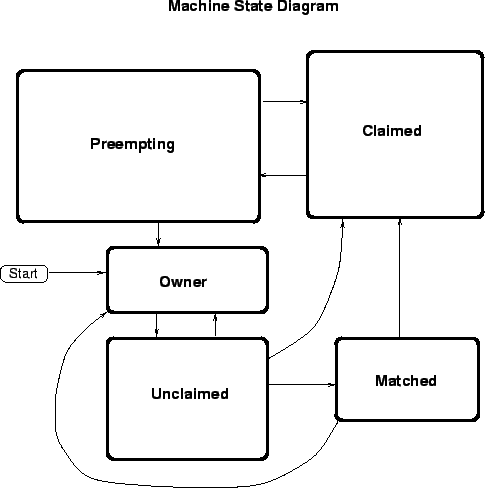
A given machine could be in a number of different states, depending on whether or not the machine is available to run Condor jobs, and if so, what stage in the Condor protocol has been reached. The possible states are:
See figure 3.2 on page
for the various states and the possible transitions between them.
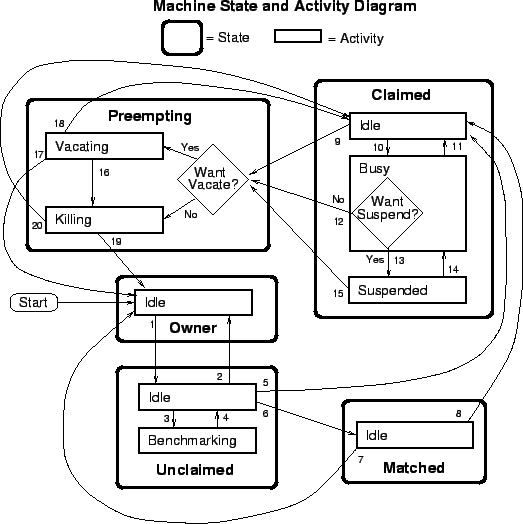
Within some of these states, there could be a number of different activities the machine is in. The idea is that all the things that are true about a given state are true regardless of what activity you are in. However, there are certain important differences between each activity, which is why they are separated out from each other within a given state. In general, you must specify both a state and an activity to describe what ``state'' the machine is in. This will be denoted in this manual as ``state/activity'' pairs. For example, ``Claimed/Busy''. The following list describes all the possible state/activity pairs:
The preempting state is used for evicting a Condor job from a given machine. When the machine enters the Preempting state, it checks the WANT_VACATE expression (described below) to decide which of the following activities it should enter:
Figure 3.3 on
page gives the overall view of all
machine states and activities, and shows all the possible transitions
from one to another within the Condor system.
Each transition is labeled with a number on the diagram, and
transition numbers referred to in this manual will be bold.
This may seem pretty daunting, but it's actually easier to handle than
it looks.
Various expressions are used to determine when and if many of these state and activity transitions occur. Other transitions are initiated by parts of the Condor protocol (such as when the condor_negotiator matches a machine with a schedd). The following section describes the conditions that lead to the various state and activity transitions.
This section will trace through all possible state and activity transitions within the machine and describe the conditions under which each one occurs. Whenever a transition occurs, the machine records when it entered its new activity and/or new state. These times are often used to write the expressions that determine when further transitions occurred (for example, you might only enter the Killing activity if you've been in the Vacating activity longer than a given amount of time).
When the startd is first spawned, the machine it represents enters the Owner state. The machine will remain in this state as long as the START expression locally evaluates to false. If the START locally evaluates to true or can't be locally evaluated (it evaluates to undefined), transition 1 will occur and the machine will enter the Unclaimed state.
So long as the START expression locally evaluates to false, there is no possible request in the Condor system that could match it, so the machine in unavailable to Condor and stays in the Owner state. For example, if the START expression was:
START : KeyboardIdle > 15 * $(MINUTE) && Owner == "coltrane"and if KeyboardIdle was only 34 seconds, then the machine would still be in the Owner state, even though it references Owner, which is undefined.
False && anything is False, even
False && undefined
If, however, the START expression was:
START : KeyboardIdle > 15 * $(MINUTE) || Owner == "coltrane"
and KeyboardIdle was still only 34 seconds, then the machine
would leave the Owner state and go to Unclaimed. This is because
``False || undefined'' is undefined. So, while this machine isn't
available to just any body, if user ``coltrane'' has jobs submitted,
the machine is willing to run them. Anyone else would have to wait
until KeyboardIdle exceeds 15 minutes. However, since
``coltrane'' might claim this resource, but hasn't yet, the machine
goes to the Unclaimed state.
While in the Owner state the startd only polls the status of the machine every UPDATE_INTERVAL to see if anything has changed that would lead it to a different state. The idea is that you don't want to put much load on the machine while the Owner is using it (frequently waking up, computing load averages, checking the access times on files, computing free swap space, etc), and there's nothing time critical that the startd needs to be sure to notice as soon as it happens. If the START expression evaluates to True and it's 5 minutes before we notice it, that's a drop in the bucket of High Throughput Computing.
The machine can only go to the Unclaimed state from the Owner state, and only does so when the START expression no longer locally evaluates to False. Generally speaking, if the START expression locally evaluates to false at any time, the machine will either transition directly to the Owner state, or to the Preempting state on its way to the Owner state, if there's a job running that needs preempting.
While in the Unclaimed state, if the START expression locally evaluates to false, the machine will return to the Owner state via transition 2.
When it's in the Unclaimed state, another expression comes into effect, RunBenchmarks . Whenever the RunBenchmarks evaluates to True while the machine is in the Unclaimed state, the machine will transition from the Idle activity to the Benchmarking activity (transition 3) and perform benchmarks to determine MIPS and KFLOPS. When the benchmarks complete, the machine returns to the Idle activity (transition 4).
The startd automatically inserts an attribute, LastBenchmark, whenever it runs benchmarks, so commonly LastBenchmark is defined in terms of this attribute, for example:
        BenchmarkTimer = (CurrentTime - LastBenchmark)
        RunBenchmarks : $(BenchmarkTimer) >= (4 * $(HOUR))
Here, a macro, BenchmarkTimer is defined to help write the
expression. The idea is that this macro holds the time since the last
benchmark, so when this time exceeds 4 hours, we run the benchmarks
again. The startd keeps a weighted average of these benchmarking
results to try to get the most accurate numbers possible. That's why
you would want the startd to run them more than once in its lifetime.
NOTE: LastBenchmark is initialized to 0 before the benchmarks have ever been run. So, if you want the startd to run benchmarks as soon as the machine is unclaimed (if it hasn't done so already), just include a term for LastBenchmark as in the example above.
NOTE: If RunBenchmarks is defined, and set to something other than ``False'', the startd will automatically run one set of benchmarks when it first starts up. So, if you want to totally disable benchmarks, both at startup, and at any time thereafter, just set RunBenchmarks to ``False'' or comment it out from your config file.
From the Unclaimed state, the machine can go to two other possible states: Matched or Claimed/Idle. Once the condor_negotiator matches an Unclaimed machine with a requester at a given schedd, the negotiator sends a command to both parties, notifying them of the match. If the schedd gets that notification and initiates the claiming procedure with the machine before the negotiator's message gets to the machine, the Match state is skipped entirely, and the machine goes directly to the Claimed/Idle state (transition 5). However, normally the machine will enter the Matched state (transition 6), even if it's only for a brief period of time.
The Matched state is not very interesting to Condor. The only noteworthy things are that the machine lies about its START expression while in this state and says that Requirements are false to prevent being matched again before it has been claimed, and that the startd starts a timer to make sure it doesn't stay in the Matched state too long. This timer is set with the MATCH_TIMEOUT config file parameter. It is specified in seconds and defaults to 300 (5 minutes). If the schedd that was matched with this machine doesn't claim it within this period of time, the machine gives up on it, goes back into the Owner state via transition 7 (which it will probably leave right away to get to the Unclaimed state again, and wait for another match).
At any time while the machine is in the Matched state, if the START expression locally evaluates to false, the machine enters the Owner state directly (transition 7).
If the schedd that was matched with the machine claims it before the MATCH_TIMEOUT expires, the machine goes into the Claimed/Idle state (transition 8).
The Claimed state is certainly the most complicated state. It has the most possible activities, and the most expressions that determine what it will do next. In addition the condor_checkpoint and condor_vacate commands only have any effect on the machine when its in the Claimed state. In general, there are two sets of expressions that might take effect, depending on if the universe of the request that claimed the machine is Standard or Vanilla. The Standard Universe expressions are the ``normal'' expressions, for example:
        WANT_SUSPEND            : True
        WANT_VACATE             : $(ActivationTimer) > 10 * $(MINUTE)
        SUSPEND                 : $(KeyboardBusy) || $(CPUBusy)
        ...
The Vanilla expressions have ``_VANILLA'' appended to the end, for example:
        WANT_SUSPEND_VANILLA    : True
        WANT_VACATE_VANILLA     : True
        SUSPEND_VANILLA         : $(KeyboardBusy) || $(CPUBusy)
        ...
If you don't specify separate vanilla versions, the normal versions will be used for all jobs, including vanilla jobs. For the purposes of this manual, we'll always refer to the regular expressions. Keep in mind that if the request was a Vanilla Universe, the Vanilla expressions (if they were defined) would be in effect, instead. The reason for this is that the resource owner might want the machine to behave differently for Vanilla jobs, since they can't checkpoint. For example, they might want to let Vanilla jobs remain suspended for much longer than standard jobs.
While Claimed, the POLLING_INTERVAL takes effect, and the startd starts polling the machine much more frequently to evaluate its state.
If the owner starts typing on the console again, we want to notice as soon as possible and start doing whatever that owner wants at that point. For SMP machines, if any virtual machine is in the Claimed state, the startd will poll the machine more frequently. If we're already polling for one virtual machine, it doesn't really cost us any more to evaluate the state of all the virtual machines at the same time.
In general, when the startd is going to kick a job off a machine (usually because of activity on the machine that signifies that the owner is using the machine again) the startd will go through successive levels of getting the job out of the way. The first and least costly to the job is suspending it. This even works for Vanilla jobs. If suspending the job for a little while doesn't satisfy the machine owner, (the owner is still using the machine after a certain period of time, for example), the startd moves on to vacating the job, which involves performing a checkpoint so that the work it had completed up until this point is not lost. If even that does not satisfy the machine owner (usually because it's taking too long and the owner wants their machine back now), the final, most drastic stage is reached: killing. Killing is just quick death to the job, without a checkpoint. For Vanilla jobs, vacating and killing are basically equivalent, though a vanilla job can request to have a certain softkill signal sent to it at vacate time so that it can perform application-specific checkpointing, for example.
The WANT_SUSPEND expression determines if the machine will even evaluate the SUSPEND expression to consider entering the Suspended activity. The WANT_VACATE expression determines what happens when the machine enters the preempting state, whether it will go to the vacating activity, or go directly to killing. If one or both of these expressions evaluates to false, the machine will skip that stage of getting rid of the job and proceed directly to the more drastic stages.
When the machine first enters the Claimed state, it goes to the Idle activity. From there, it has two options. It can enter the Preempting state via transition 9 (if a condor_vacate comes in, or if the START expression locally evaluates to false). Or, it can enter the busy activity (transition 10) if the schedd that has claimed the machine decides to activate the claim and start a job.
From Claimed/Busy, the machine can go to many different state/activity combinations. The startd evaluates the WANT_SUSPEND expression to decide which other expressions to evaluate. If WANT_SUSPEND is true, the startd will evaluate the SUSPEND expression, and if it is false, the startd will evaluate the PREEMPT expression and skip the Suspended activity entirely. Here are all the possible state/activity destinations that the machine can get to from Claimed/Busy:
You already know what happens in Claimed/Idle, so now we'll discuss what happens in Claimed/Suspended. Again, there are multiple state/activity combinations that you can reach from Claimed/Suspended:
From the Claimed state, you can only enter other activities in the Claimed state (all of which we've already discussed), or the Preempting state, which is described next.
The Preempting state is much less complicated than the Claimed state. Basically, there are two possible activities, and two possible destinations. Depending on WANT_VACATE you either enter the Vacating activity (if it's true) or the Killing activity (if it's false).
While in the Preempting state (regardless of activity) the machine advertises its Requirements expression as False to signify that it is not available for further matches, either because it is about to go to the owner state anyway, or because it has already been matched with one preempting match, and further preempting matches are disallowed until the machine has been claimed by the new match.
The main function of the Preempting state is to get rid of the starter associated with this resource. If the condor_starter associated with a given claim exits while the machine is still in the Vacating activity, it means the job successfully completed its checkpoint.
If the machine is in the Vacating activity, it keeps evaluating the KILL expression. As soon as this expression evaluates to true, the machine enters the Killing activity (transition 16).
When the starter exits, or if there was no starter running when the machine enters the Preempting state (because it came from Claimed/Idle), the other job of the preempting state is completed: notifying the schedd that had claimed this machine that the claim is broken.
At this point, the machine will either enter the Owner state via transition 17 (if the job was preempted because the machine owner came back) or the Claimed/Idle state via transition 18 (if the job was preempted because a better match was found).
Then the machine enters the Killing activity, it begins a timer, the length of which is defined by the KILLING_TIMEOUT macro. This macro is defined in seconds and defaults to 30. If this timer expires and the machine is still in the Killing activity, something has gone seriously wrong with the condor_starter and the startd tries to vacate the job immediately by sending SIGKILL to all of the condor_starter's children, and then to the condor_starter itself.
Again, once the starter is gone and the schedd that had claimed the machine is notified that the claim is broken, the machine will either enter the Owner state via transition 19 (if the job was preempted because the machine owner came back) or the Claimed/Idle state via transition 20 (if the job was preempted because a better match was found).
The following section provides two examples of how you might configure the policy at your pool. Each one is described in English, then the actual macros and expressions used are listed and explained with comments. Finally the entire set of macros and expressions are listed in one block so you can see them in one place for easy reference.
These settings are the default as shipped with Condor. They have been used for many years with no problems. The Vanilla expressions are identical to the regular ones. (They aren't even listed here. If you don't define them, the regular expressions are used for Vanilla jobs as well).
First, we define a bunch of macros which help us write the expressions more clearly. In particular, we use:
##  These macros are here to help write legible expressions:
MINUTE          = 60
HOUR            = (60 * $(MINUTE))
StateTimer      = (CurrentTime - EnteredCurrentState)
ActivityTimer   = (CurrentTime - EnteredCurrentActivity)
ActivationTimer = (CurrentTime - JobStart)

NonCondorLoadAvg        = (LoadAvg - CondorLoadAvg)
BackgroundLoad          = 0.3
HighLoad                = 0.5
StartIdleTime           = 15 * $(MINUTE)
ContinueIdleTime        = 5 * $(MINUTE)
MaxSuspendTime          = 10 * $(MINUTE)
MaxVacateTime           = 5 * $(MINUTE)

KeyboardBusy            = KeyboardIdle < $(MINUTE)
CPU_Idle                = $(NonCondorLoadAvg) <= $(BackgroundLoad)
CPU_Busy                = $(NonCondorLoadAvg) >= $(HighLoad)
MachineBusy             = ($(CPU_Busy) || $(KeyboardBusy))
Now, we define that we always want to suspend jobs. If that's not enough, we'll always try to gracefully vacate them, unless they've only been running for less than 10 minutes anyway, in which case we'll just kill them, instead of trying to checkpoint those 10 minutes of work.
WANT_SUSPEND            : True
WANT_VACATE             : $(ActivationTimer) > 10 * $(MINUTE)
Finally, we define the actual expressions. Start any job if the CPU is idle (as defined by our macro), and the keyboard has been idle long enough.
START : $(CPU_Idle) && KeyboardIdle > $(StartIdleTime)
Suspend a job if the machine is busy.
SUSPEND : $(MachineBusy)
Continue a suspended job if the CPU is idle and the Keyboard has been idle for long enough.
CONTINUE : $(CPU_Idle) && KeyboardIdle > $(ContinueIdleTime)
There are two conditions that we want to preempt under. First, if we have suspended the job, but it's been suspended too long. Second, if we don't even want to suspend the job, and the machine is busy.
PREEMPT	        : ( ($(ActivityTimer) > $(MaxSuspendTime)) && \
                   (Activity == "Suspended") ) || \
                  ( $(MachineBusy) && (WANT_SUSPEND == False) )
Kill a job if we've been vacating for too long.
KILL : $(ActivityTimer) > $(MaxVacateTime)
Finally, specify we want periodic checkpointing. For jobs smaller than 60 megs, we periodic checkpoint every 6 hours. For larger jobs, we only checkpoint every 12 hours.
PERIODIC_CHECKPOINT     : ( (ImageSize < 60000) && \
                            ($(LastCkpt) > (6 * $(HOUR))) ) || \
                          ( $(LastCkpt) > (12 * $(HOUR)) )
For clarity and reference, the entire set policy settings are included once more without comments:
##  These macros are here to help write legible expressions:
MINUTE          = 60
HOUR            = (60 * $(MINUTE))
StateTimer      = (CurrentTime - EnteredCurrentState)
ActivityTimer   = (CurrentTime - EnteredCurrentActivity)
ActivationTimer = (CurrentTime - JobStart)
LastCkpt	= (CurrentTime - LastPeriodicCheckpoint)

NonCondorLoadAvg        = (LoadAvg - CondorLoadAvg)
BackgroundLoad          = 0.3
HighLoad                = 0.5
StartIdleTime           = 15 * $(MINUTE)
ContinueIdleTime        = 5 * $(MINUTE)
MaxSuspendTime          = 10 * $(MINUTE)
MaxVacateTime           = 5 * $(MINUTE)

KeyboardBusy            = KeyboardIdle < $(MINUTE)
CPU_Idle                = $(NonCondorLoadAvg) <= $(BackgroundLoad)
CPU_Busy                = $(NonCondorLoadAvg) >= $(HighLoad)
MachineBusy             = ($(CPU_Busy) || $(KeyboardBusy))

WANT_SUSPEND            : True
WANT_VACATE             : $(ActivationTimer) > 10 * $(MINUTE)

START           : $(CPU_Idle) && KeyboardIdle > $(StartIdleTime)
SUSPEND         : $(MachineBusy)
CONTINUE        : $(CPU_Idle) && KeyboardIdle > $(ContinueIdleTime)
PREEMPT	        : ( ($(ActivityTimer) > $(MaxSuspendTime)) && \
                   (Activity == "Suspended") ) || \
                  ( $(MachineBusy) && (WANT_SUSPEND == False) )
KILL            : $(ActivityTimer) > $(MaxVacateTime)

PERIODIC_CHECKPOINT     : ( (ImageSize < 60000) && \
                            ($(LastCkpt) > (6 * $(HOUR))) ) || \
                          ( $(LastCkpt) > (12 * $(HOUR)) )
Due to a recent increase in the number of Condor users and the size of their jobs (many users here are submitting jobs with an Imagesize of over 100 megs!), we have had to customize our policy to try to handle this range of Imagesize better.
Basically, whether or not we suspend or vacate jobs is now a function of the Imagesize of the job that's currently running (which is defined in terms of kilobytes). We have divided the Imagesize into three possible categories, which we define with macros.
BigJob          = (ImageSize > (30 * 1024))
MediumJob       = (ImageSize <= (30 * 1024) && ImageSize >= (10 * 1024))
SmallJob        = (ImageSize < (10 * 1024))
Our policy can be summed up with the following few sentences: If the job is ``small'', it goes through the normal progression of suspend to vacate to kill based on the tried and true times. If the job is ``medium'', when the user comes back, we start vacating the job right away. The idea is that if we checkpoint immediately, all our pages are still in memory, checkpointing will be fast, and we'll free up memory pages as soon as we checkpoint. If we suspend, our pages will start getting swapped out and when we finally want to checkpoint (10 minutes later), we'll have to start swapping out the user's pages again, they'll see reduced performance, and checkpointing will take much longer. If the job is ``big'', don't even bother checkpointing, since we won't finish before the owner gets too upset and we might as well not even bother putting the wasted load on the network and checkpoint server.
All the logic for our pool's special policy is tuned with the WANT_ expressions. All of the other expressions and macros just use the defaults. We only want to suspend jobs if they are ``small'', and we only want to vacate jobs that are ``small'' or ``medium''. We still want to always suspend Vanilla jobs, regardless of their size.
WANT_SUSPEND            : $(SmallJob)
WANT_VACATE             : $(MediumJob) || $(SmallJob)
WANT_SUSPEND_VANILLA    : True
WANT_VACATE_VANILLA     : True
Now, we define the actual expressions, (which we just use the defaults for). We really do this with macros and simply define the expressions with the macros later on. This may seem really strange, but we do it because it makes it easier to do special customized settings (for example, for testing purposes) and still reference the defaults. There will be a brief example of this at the end of this section.
CS_START        = $(CPU_Idle) && KeyboardIdle > $(StartIdleTime)
CS_SUSPEND      = $(MachineBusy)
CS_CONTINUE     = (KeyboardIdle > $(ContinueIdleTime)) && $(CPU_Idle)
CS_PREEMPT      = ( ($(ActivityTimer) > $(MaxSuspendTime)) && \
                   (Activity == "Suspended") ) || \
                  ( $(MachineBusy) && (WANT_SUSPEND == False) )
CS_KILL         = ($(ActivityTimer) > $(MaxVacateTime))
Here's where we actually define the expressions in terms of our special macros:
START       : $(CS_START)
SUSPEND     : $(CS_SUSPEND)
CONTINUE    : $(CS_CONTINUE)
PREEMPT     : $(CS_PREEMPT)
KILL        : $(CS_KILL)
We still don't want to define separate Vanilla versions of any of these, since we already have a different WANT_SUSPEND for vanilla jobs and all of the policy expressions are just written in terms of that.
Periodic checkpointing also takes image size into account. Since we kill large jobs right away at eviction time, we want to periodically checkpoint them more frequently (every 3 hours), since that's the only way they make forward progress. However, with all those large periodic checkpoints going on on so frequently, we don't want to bog down our network or our checkpoint servers. So, we only periodic checkpoint small or medium jobs every 12 hours, since they get the privilege of checkpointing at eviction time.
PERIODIC_CHECKPOINT  : (($(LastCkpt) > (3 * $(HOUR))) \
      && $(BigJob)) || (($(LastCkpt) > (12 * $(HOUR))) && \
      ($(SmallJob) || $(MediumJob)))
For clarity and reference, the entire set of policy settings are included once more, without comments:
ActivationTimer = (CurrentTime - JobStart)
StateTimer      = (CurrentTime - EnteredCurrentState)
ActivityTimer   = (CurrentTime - EnteredCurrentActivity)
LastCkpt        = (CurrentTime - LastPeriodicCheckpoint)

NonCondorLoadAvg   = (LoadAvg - CondorLoadAvg)
BackgroundLoad     = 0.3
HighLoad           = 0.5
StartIdleTime      = 15 * $(MINUTE)
ContinueIdleTime   = 5 * $(MINUTE)
MaxSuspendTime     = 10 * $(MINUTE)
MaxVacateTime      = 5 * $(MINUTE)

KeyboardBusy       = KeyboardIdle < $(MINUTE)
CPU_Idle           = $(NonCondorLoadAvg) <= $(BackgroundLoad)
CPU_Busy           = $(NonCondorLoadAvg) >= $(HighLoad)
MachineBusy        = ($(CPU_Busy) || $(KeyboardBusy))

BigJob       = (ImageSize > (30 * 1024))
MediumJob    = (ImageSize <= (30 * 1024) && ImageSize >= (10 * 1024))
SmallJob     = (ImageSize < (10 * 1024))

WANT_SUSPEND            : $(SmallJob)
WANT_VACATE             : $(MediumJob) || $(SmallJob)
WANT_SUSPEND_VANILLA    : True
WANT_VACATE_VANILLA     : True

CS_START    = $(CPU_Idle) && KeyboardIdle > $(StartIdleTime)
CS_SUSPEND  = $(CPU_Busy) || $(KeyboardBusy)
CS_CONTINUE = (KeyboardIdle > $(ContinueIdleTime)) && $(CPU_Idle)
CS_PREEMPT  = ( ($(ActivityTimer) > $(MaxSuspendTime)) && \
               (Activity == "Suspended") ) || \
              ( $(MachineBusy) && (WANT_SUSPEND == False) )
CS_KILL     = ($(ActivityTimer) > $(MaxVacateTime))

START       : $(CS_START)
SUSPEND     : $(CS_SUSPEND)
CONTINUE    : $(CS_CONTINUE)
PREEMPT     : $(CS_PREEMPT)
KILL        : $(CS_KILL)

PERIODIC_CHECKPOINT  : (($(LastCkpt) > (3 * $(HOUR))) \
      && $(BigJob)) || (($(LastCkpt) > (12 * $(HOUR))) && \
      ($(SmallJob) || $(MediumJob)))
As a final example, we show how our default macros can be used to setup a given machine for testing. Suppose we want the machine to behave just like normal, but if user ``coltrane'' submits a job, we want that job to start regardless of what's happening on the machine, and we don't want the job suspended, vacated or killed. For example, we might know ``coltrane'' is just going to be submitting very short running programs to test something and he wants to see them execute right away. Anyway, we could configure any machine (or our whole pool, for that matter) with the following 5 expressions:
        START      : ($(CS_START)) || Owner == "coltrane"
        SUSPEND    : ($(CS_SUSPEND)) && Owner != "coltrane"
        CONTINUE   : $(CS_CONTINUE)
        PREEMPT    : ($(CS_PREEMPT)) && Owner != "coltrane"
        KILL       : $(CS_KILL)
Notice that you don't have to do anything special with either the
CONTINUE or KILL expressions.
If Coltrane's jobs never suspend, they'll never even look at
CONTINE.
Similarly, if they never preempt, they'll never look at KILL.
This section describes how the policy expressions just layed out differ from the policy expressions in previous versions of Condor. If you've never used Condor version 6.0 or earlier, or never looked closely at the policy settings, you can probably skip this section.
In summary, there is no longer a VACATE expression, and the KILL expression is not evaluated while a machine is claimed. There is only a PREEMPT expression which describes the conditions when a machine will move from the Claimed state to the Preempting state. Once a machine has decided to go into the Preempting state, the WANT_VACATE expression controls whether or not the job should be vacated with a checkpoint or directly killed. The KILL expression only determines when the machine goes from Preempting/Vacating to Preempting/Killing.
Before, the KILL expression had to handle three distinct cases (the transitions from Claimed/Busy, Claimed/Suspended and Preepting/Vacating) and the VACATE expression had to handle two (the transitions from Claimed/Busy and Claimed/Suspended). Now, PREEMPT has to handle the same two cases as the previous VACATE expression, but the KILL expression only handles one. In fact, very complicated policies can now be specified using all of the default expressions, and only tuning the WANT_VACATE and WANT_SUSPEND expressions. In previous versions, if you made heavy use of the WANT_* expressions, the KILL expression could become incredibly complicated.